
ANALYZER

Analyze your Tap to Pay on
iPhone marketing instantly

Upload your marketing and get instant compliance analysis against Apple’s 42-page guidelines — with the exact fixes.

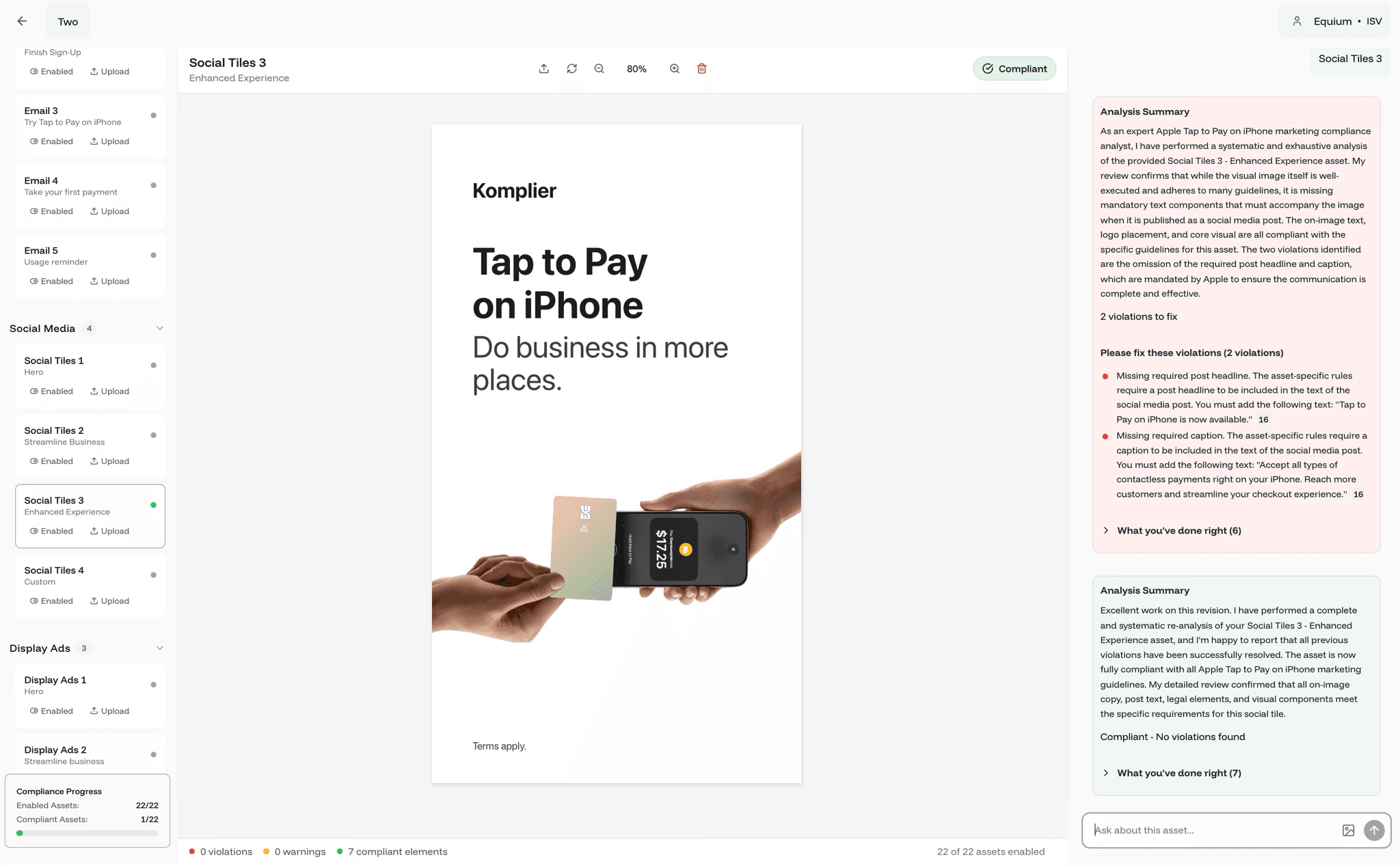
Social Tiles 3
Enhanced Experience
!3 violations to fix
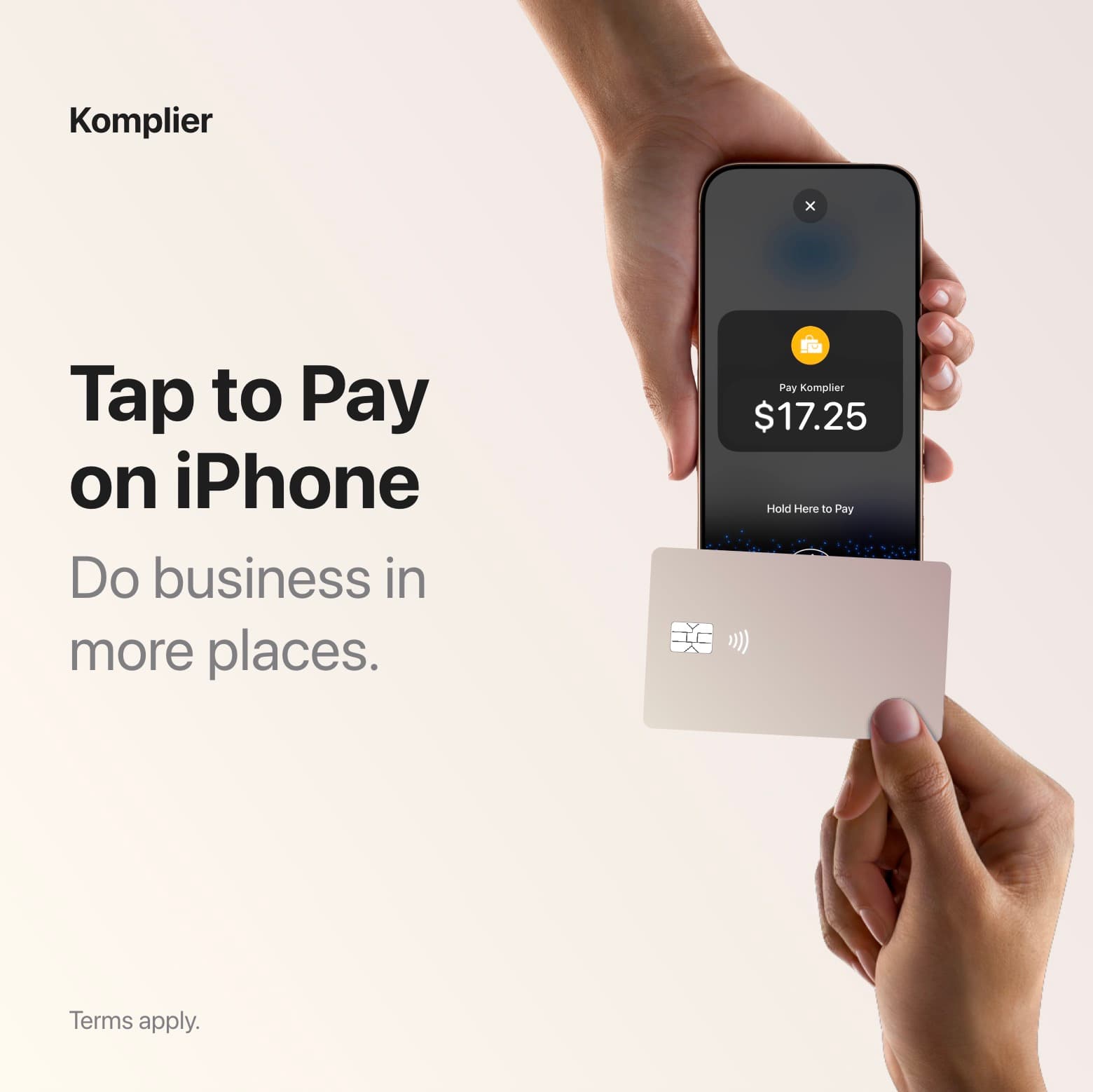
Komplier social tile: “Tap to Pay on iPhone — Do business in more places.”
0 violations0 warnings6 compliant elements
Explore success stories →
The AI catches things our legal team missed. We've had zero Apple rejections since implementing Komplier 8 months ago.
Michael Rodriguez
CMO
FinanceFlow
The Komplier Analyzer showing a social tile, its violations and the compliant re-analysisWatch the Analyzer check a social tile against Apple’s guide

AI-powered, human refined

Upload, analyze, and fix with AI

AI Asset
Analysis

Our AI instantly scans your existing marketing materials against Apple’s comprehensive 42-page guidelines, identifying every compliance issue with pinpoint accuracy.

From an asset to an answer.Analysis example
social-tile.jpg
Uploaded Komplier social tile
Ready to review
Feature namingReady
Required copyReady
Device imageryReady
Your assetApple’s guidelinesSpecific feedback

AI Violation
Corrections

Our AI will not only detect violations for you, but it will also provide you with specific fixes to make your content Apple-approved. Just fix them and then re-analyze.

Find it. Fix it. Check it again.Correction example
Original headline1 naming issue

Accept payments with Tap to Pay.

The rule behind the correction

Write “Tap to Pay on iPhone” in full. Keep the feature name and capitalization intact.

Apple’s guide p.6
A specific correction, with the source attached.

Marketing
Guidance

You can ask our AI any questions you have, like when to send emails, what to say in your ads, and what Apple’s guidelines allow.

A useful answer. The rule behind it.Guide assistant
You

Can I shorten it to “Tap to Pay”?

✧ AI Marketing Guide Assistant

Write “Tap to Pay on iPhone” in full. Don’t shorten the name or use “TTPOI” in customer-facing copy.

In practice

Try Tap to Pay on iPhone today.

Apple’s guide p.6
From an asset to an answer.Analysis example
social-tile.jpg
Uploaded Komplier social tile
Ready to review
Feature namingReady
Required copyReady
Device imageryReady
Your assetApple’s guidelinesSpecific feedback
Find it. Fix it. Check it again.Correction example
Original headline1 naming issue

Accept payments with Tap to Pay.

The rule behind the correction

Write “Tap to Pay on iPhone” in full. Keep the feature name and capitalization intact.

Apple’s guide p.6
A specific correction, with the source attached.
A useful answer. The rule behind it.Guide assistant
You

Can I shorten it to “Tap to Pay”?

✧ AI Marketing Guide Assistant

Write “Tap to Pay on iPhone” in full. Don’t shorten the name or use “TTPOI” in customer-facing copy.

In practice

Try Tap to Pay on iPhone today.

Apple’s guide p.6

Multi-Format Support

Upload screenshots, copy docs, or entire marketing materials. Our analyzer handles it all and gives you comprehensive feedback.

Apple guideline citations

Every violation cites the page of Apple’s marketing guide it comes from, so you can check the source yourself.

Multi-Asset Project Management

Manage entire campaigns with unified compliance tracking across all materials.

Export & Integration Ready

Download compliance-verified assets ready for immediate deployment across all channels.

What the Analyzer catches

Every rule in Apple’s guide, from naming and trademarks to disclaimers and card art. 6 categories across 42 pages.

Write “Tap to Pay on iPhone” in full, never “Tap to Pay”
Never abbreviate to TTPOI in customer-facing copy
Do not position it as an Apple product you offer
Add “Terms apply.” where space is limited
Use the full disclaimer on all advertising
Apple Pay disclaimer when digital wallets are shown
Never use the Apple logo as a word
No possessive or plural of Apple trademarks
Do not modify or animate Apple marks
Show a supported iPhone, no third-party hardware
No dongles, readers or cases in device imagery
Card art must be generic, no real bank cards
Focus on customer value, not Apple features
Do not claim exclusivity or “first”
Required post headline for social tiles
Required caption for social tiles
Push notifications: approved copy only
Press release: approved boilerplate paragraph
Finally, a tool that understands Apple's guidelines as well as we need to. The compliance checking is incredibly thorough and accurate.
Emily Watson
Brand Manager
QuickPay

Ready to build yourTap to Pay on iPhonemarketing?

What teams achieve
with the Analyzer

42

pages of Apple guidelines checked

22+

asset templates covered

1-3 days

to a compliant campaign

3-9 months

without Komplier

$5,000+

traditional cost avoided

Built on Apple’s marketing guide, not guesswork

Every page

Reads all 42 pages, every time

The Analyzer checks your asset against the complete Tap to Pay on iPhone marketing guide, including the sections most teams never reach.

Citations

Shows the source page

Each violation links to the page it comes from, so you can verify the rule and share it with legal or your agency.

Per asset type

Knows the rules for each asset

Emails, social tiles, display ads, in-app banners, press releases and SEO copy each have their own requirements. The Analyzer applies the right ones.

Approved copy

Suggests copy Apple accepts

Fixes are drawn from the approved copy library, so a correction is not just a flag but text you can ship.

Komplier saved us 3 weeks on our latest campaign. What used to be a back-and-forth nightmare with Apple compliance became a smooth, predictable process.
Sarah Chen
Marketing Director
PayTech Solutions

How teams use the Analyzer

The whole campaign, in view.Project example
Social tile
social-tile.jpgHeadline + caption

Review the headline and required caption together.

Asset-specific review ↗
3 assetsOne projectFeedback per placement
A rejection with a clear next step.Rejected asset example
!Review feedback: use the full feature name.
Original headline1 naming issue

Accept payments with Tap to Pay.

The rule behind the correction

Write “Tap to Pay on iPhone” in full. Keep the feature name and capitalization intact.

Apple’s guide p.6
A specific correction, with the source attached.
Catch the wording before the design.Copy check example
Campaign copy.txtText only
Headline

Get paid with TTPOI.

Body

Accept contactless payments right on your iPhone.

Ready for a first pass.

Check the words while they’re still easy to change.

No artwork needed.
A useful answer. The rule behind it.Guide assistant
You

What kind of payment card can I show?

✧ AI Marketing Guide Assistant

Use generic card artwork. Avoid showing a real bank card in your marketing assets.

In practice

Keep the card design generic and unbranded.

Apple’s guide p.30
01

Check an existing campaign

Upload the assets you have already built and see every violation before Apple does.

The whole campaign, in view.Project example
Social tile
social-tile.jpgHeadline + caption

Review the headline and required caption together.

Asset-specific review ↗
3 assetsOne projectFeedback per placement
02

Fix a rejected asset

Paste the asset that came back from review and get the specific correction, with the guideline page attached.

A rejection with a clear next step.Rejected asset example
!Review feedback: use the full feature name.
Original headline1 naming issue

Accept payments with Tap to Pay.

The rule behind the correction

Write “Tap to Pay on iPhone” in full. Keep the feature name and capitalization intact.

Apple’s guide p.6
A specific correction, with the source attached.
03

Pre-check copy before design

Run the headline and body copy through the Analyzer before anyone opens a design tool.

Catch the wording before the design.Copy check example
Campaign copy.txtText only
Headline

Get paid with TTPOI.

Body

Accept contactless payments right on your iPhone.

Ready for a first pass.

Check the words while they’re still easy to change.

No artwork needed.
04

Ask the guide a question

Use the AI Marketing Guide Assistant when you need the rule, not the fix.

A useful answer. The rule behind it.Guide assistant
You

What kind of payment card can I show?

✧ AI Marketing Guide Assistant

Use generic card artwork. Avoid showing a real bank card in your marketing assets.

In practice

Keep the card design generic and unbranded.

Apple’s guide p.30
We uploaded the whole launch campaign on a Friday and had every violation, with the Apple page it came from, before lunch. The fixes were one click.
Omar Haddad
Head of Growth
Equium

Frequently asked questions

Apple’s 42-page Tap to Pay on iPhone marketing guide, plus the asset-specific requirements for each of the 22+ template types. Every violation cites the page it comes from.

Screenshots, copy documents, or entire marketing materials. The Analyzer handles images and text and gives you comprehensive feedback on both.

A summary of the asset, the list of violations with the Apple guideline page for each, and what you have already done right.

It proposes the specific fix. You apply it and re-analyze, and the asset is marked compliant when nothing is left to correct.

Yes. The Free plan includes 1 analyzer project, 1 AI analysis and 3 AI questions, with no credit card required.

The Analyzer checks assets you already have. The Asset Builder creates new ones from 22+ compliant templates with real-time checking as you build.